

The shift to remote work has shattered the traditional network perimeter. Employees are accessing corporate resources from coffee shops, home offices, and airports, using a mix of company-issued and personal devices. The old “castle and moat” security model—where everyone inside the network is trusted—is no longer sufficient. It’s time for a new approach.
This is where Zero Trust Network Access (ZTNA) comes in. Unlike traditional VPNs that grant broad network access once a user logs in, ZTNA operates on a simple yet powerful principle: never trust, always verify. For IT Managers and CTOs navigating the complexities of remote work cybersecurity, ZTNA offers a way to secure sensitive data without hindering productivity.
In this guide, we will explore what ZTNA is, why it is superior to legacy solutions, and provide a step-by-step roadmap for implementing it within your organization.
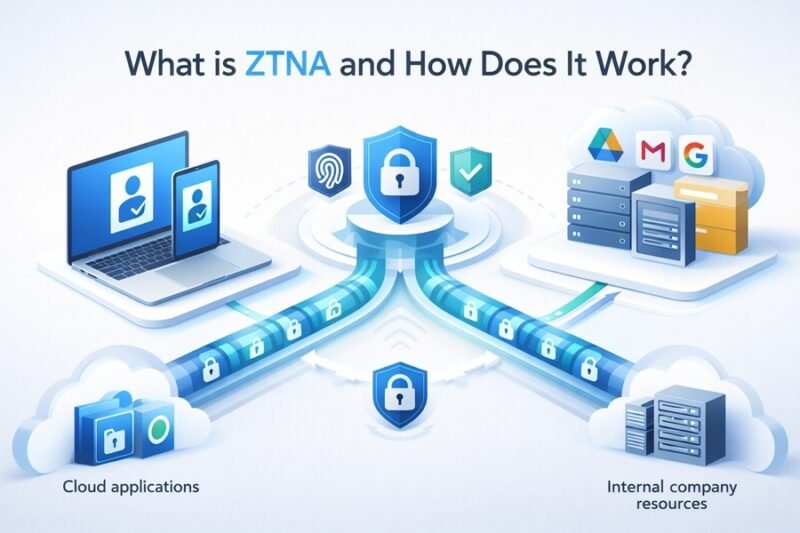
What is ZTNA and How Does It Work?
To understand how to implement this security model, we must first answer the fundamental question: What is ZTNA?
Zero Trust Network Access (ZTNA) is a security framework that provides secure remote access to applications and services based on defined access control policies. Unlike a VPN, which often places the user on the network itself, ZTNA grants access only to specific applications. The user is never trusted by default, regardless of their location or IP address.
The Core Principles of Zero Trust
The Zero Trust security model is built on three main pillars:
- Verify Explicitly: Always authenticate and authorize based on all available data points, including user identity, location, device health, service or workload, data classification, and anomalies.
- Use Least Privilege Access: Limit user access with Just-In-Time and Just-Enough-Access (JIT/JEA), risk-based adaptive polices, and data protection to secure both data and productivity.
- Assume Breach: Minimize blast radius and segment access. Verify end-to-end encryption and use analytics to get visibility, drive threat detection, and improve defenses.
By isolating application access from network access, ZTNA reduces the attack surface significantly. If an attacker compromises a user’s device, they cannot move laterally across the network because they never truly enter it.
ZTNA vs VPN: Why It’s Time to Switch
For decades, the Virtual Private Network (VPN) was the gold standard for remote access. However, the shortcomings of VPNs in a modern, cloud-first world are becoming impossible to ignore. When comparing ZTNA vs VPN, several key differences emerge that highlight why ZTNA is the superior choice for remote teams.
- Security: VPNs typically grant full network access. Once inside, a user (or a hacker with stolen credentials) can often move freely. ZTNA grants access only to specific apps, preventing lateral movement.
- User Experience: VPNs can be slow, requiring users to log in and out frequently, often backhauling traffic through a central data center. ZTNA provides a seamless, direct-to-cloud experience that is invisible to the user.
- Scalability: Managing VPN concentrators and appliances becomes a nightmare as remote teams grow. ZTNA is software-defined and cloud-delivered, making it infinitely easier to scale.
- Visibility: ZTNA provides granular visibility into who is accessing what application and when, whereas VPN logs often lack this level of detail.
The Benefits of ZTNA for Remote Teams
Adopting a Zero Trust security model isn’t just about tightening security; it’s about enabling your workforce.
Enhanced Security Posture
By effectively hiding applications from the public internet, ZTNA makes them invisible to unauthorized users. This “dark cloud” approach protects your assets from DDoS attacks and other internet-based threats.
Improved Performance and Productivity
Remote employees need fast access to their tools. ZTNA often routes traffic directly to the application (whether it’s in the public cloud or a private data center) rather than backhauling it through a corporate choke point. This reduces latency and improves the user experience.
Simplified Management for IT
For IT teams, ZTNA simplifies the onboarding and offboarding process. You can grant access to specific applications based on a user’s role without having to configure complex firewall rules or network segmentation manually.
Implementing ZTNA: A Step-by-Step Guide
Transitioning to ZTNA is a journey, not an overnight switch. Here is a practical roadmap to help you deploy this architecture effectively.
1. Identify Your Resources and Users
You cannot protect what you do not know. Start by creating a comprehensive inventory of your private applications—whether they are hosted on-premises, in AWS, Azure, or Google Cloud. Next, map out your user groups. Who needs access to which applications?
- Audit Applications: List all internal apps (HR systems, code repositories, financial dashboards).
- Map User Roles: Define access needs for different departments (e.g., Marketing needs access to the CMS, but not the production database).
2. Choose the Right Vendor and Architecture
The market is flooded with ZTNA solutions. Some are standalone, while others are part of a broader SASE architecture (Secure Access Service Edge). When selecting a vendor, consider:
- Deployment Method: Client-based (agent installed on device) vs. clientless (browser-based). Client-based is generally more secure for managed devices, while clientless is great for contractors.
- Integration: Does it integrate easily with your existing Identity Provider (IdP) like Okta, Azure AD, or Ping Identity?
- Global Presence: Does the vendor have Points of Presence (PoPs) near your remote users to ensure low latency?
3. Define and Configure Access Policies
This is the heart of Zero Trust. You need to translate your “least privilege” concepts into concrete policies.
- Context-Aware Policies: Don’t just look at the password. Create policies that check device posture. Is the antivirus running? Is the OS patched? If not, deny access.
- Granular Segmentation: Create specific segments. Developers get access to JIRA and GitHub; Sales gets access to Salesforce and email. Never mix the two.
4. Deploy and Test
Start small. Do not roll out ZTNA to the entire company at once.
- Pilot Phase: Select a small, tech-savvy group of users (like the IT team) to test the solution.
- Gather Feedback: Monitor latency, connection stability, and ease of use.
- Iterate: Tweak your policies based on the pilot results before expanding to other departments.
5. Phase Out Legacy VPNs
Once ZTNA is fully operational and stable, you can begin decommissioning your legacy VPN concentrators. This will reduce your hardware footprint and maintenance costs, finalizing your move to a modern remote work cybersecurity posture.
Challenges and Considerations
While the benefits are clear, implementing ZTNA comes with hurdles.
- Legacy Application Support: Some older, on-premises applications may not support modern authentication protocols (like SAML or OIDC) required by ZTNA solutions. You may need to use connectors or update these apps.
- Cultural Shift: Zero Trust changes how people work. Employees might be frustrated if their device is blocked because they missed an OS update. Clear communication and training are vital to ensure user adoption.
- Integration Complexity: Integrating ZTNA with existing SIEM (Security Information and Event Management) tools and endpoint protection platforms requires careful planning to ensure you maintain visibility across your security stack.
Securing the Future of Remote Work
The perimeter is dead, but your security strategy doesn’t have to be. By moving away from implicit trust and adopting ZTNA, organizations can secure their remote workforce more effectively than ever before. It provides the granularity needed to protect sensitive data while offering the speed and flexibility remote employees demand.
Implementing ZTNA is a strategic move that aligns your IT infrastructure with the reality of modern work. Start assessing your applications today, and take the first step toward a more secure, Zero Trust future.
Frequently Asked Questions (FAQ)
What is the difference between ZTNA and a firewall?
A firewall protects the network perimeter, filtering traffic based on IP addresses and ports. ZTNA protects applications by verifying the user and device identity before granting access, regardless of network location. Firewalls are network-centric; ZTNA is user-and-application-centric.
Can ZTNA replace my VPN entirely?
For most use cases, yes. ZTNA provides more secure and granular access to private applications than a VPN. However, there may be specific legacy scenarios or technical protocols where a VPN is still temporarily required until those applications can be modernized.
Is ZTNA part of SASE?
Yes, ZTNA is a core component of the SASE architecture. SASE (Secure Access Service Edge) combines network security functions (like ZTNA, SWG, and CASB) with WAN capabilities (like SD-WAN) to support the dynamic, secure access needs of organizations.
Do I need to install software on user devices for ZTNA?
It depends on the deployment model. Client-based ZTNA requires an agent on the device, offering deeper security checks (device posture) and better support for non-web apps. Clientless ZTNA works through a web browser, which is easier for third-party contractors but offers less granular control over the device itself.
Read Also: How to Download and Use the Google Desktop Camera App on Windows & Mac
